A shared project tree among developers and AI

Depict your project tree, know it back and forth.

What is Umtri?

An interface that draws your project as a tree

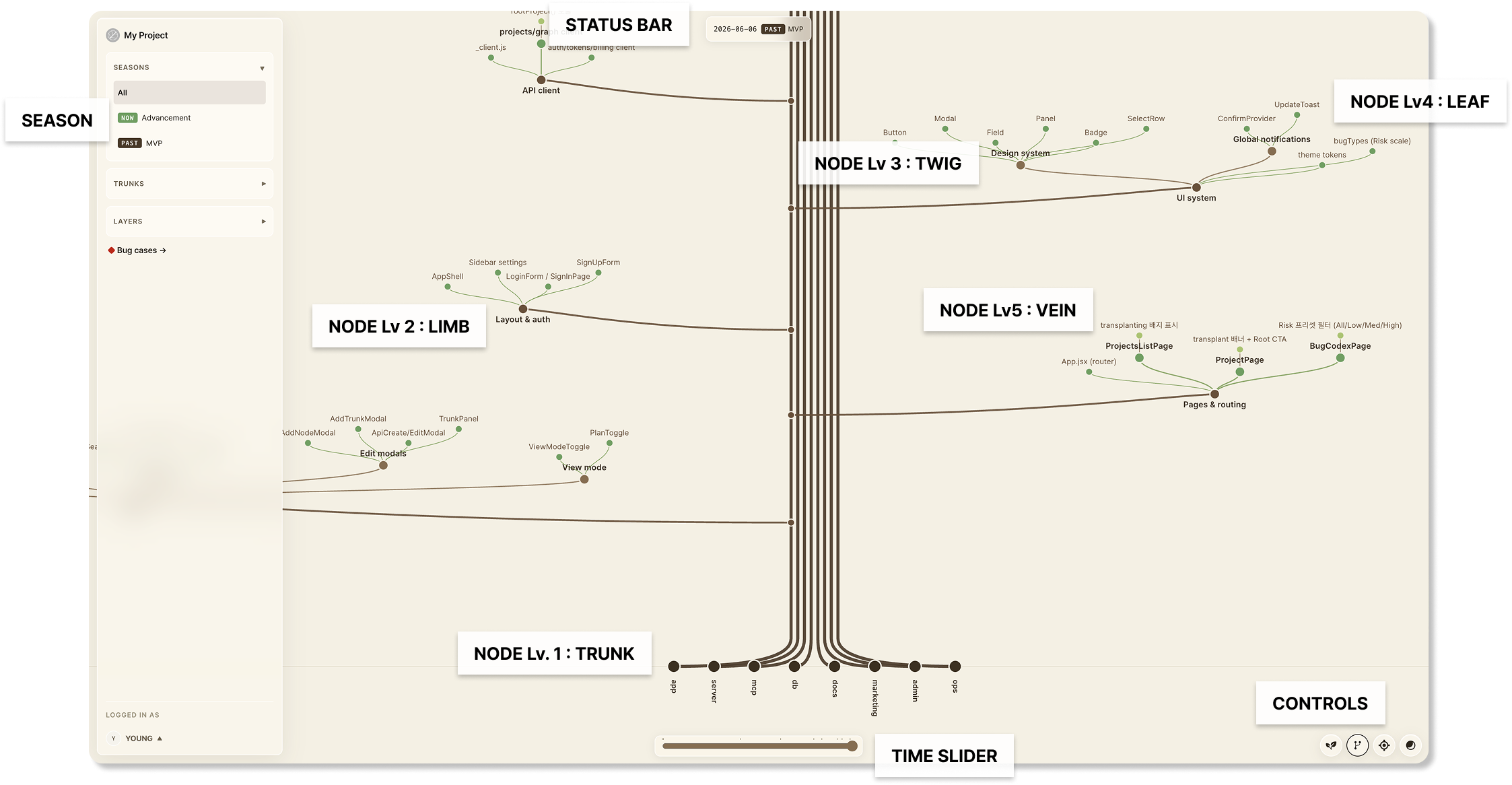
Umtri uses a tree as its metaphor for the parts of a project, laying out the structure in five layers — trunk, limb, twig, leaf, vein. The more domains it spans, the wider it grows (x-axis); the more its information branches, the taller it rises (y-axis).

trunktrunkdomains
limblimbfeatures
twigtwigmodules
leafleafobjects
veinveinactions
An Umtri tree annotated with trunk, limb, twig, leaf, vein and the season slider

Why Umtri?

Explore and understand complex software with ease.

Umtri draws the structure and records each node as it appears, split by season — so the shape the project has now and the history behind it both read at a glance. Connections, issues, and AI collaboration build on top.

Connections

Trace the links between nodes.

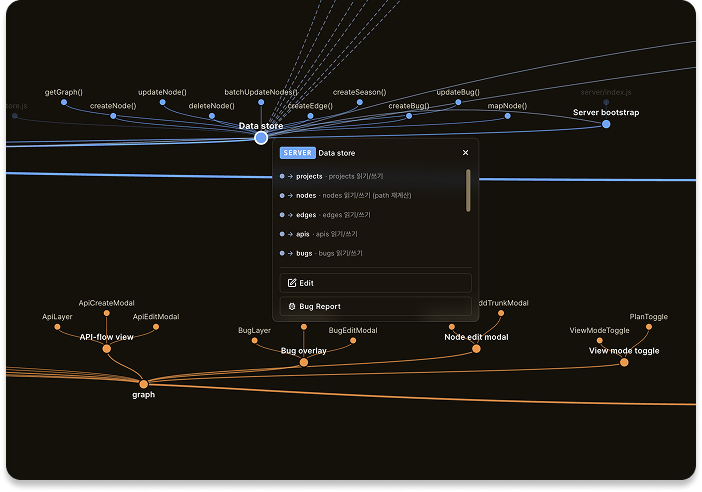
Umtri visualizes the data wired to each node, so the connections and impact between parts read at a glance. Recorded connections reveal what else sits in the blast radius, making damage and recovery scope easy to gauge when something breaks.

Umtri tracing the data connections wired to a node
Bugs

Mark where bugs strike, and how risky they are.

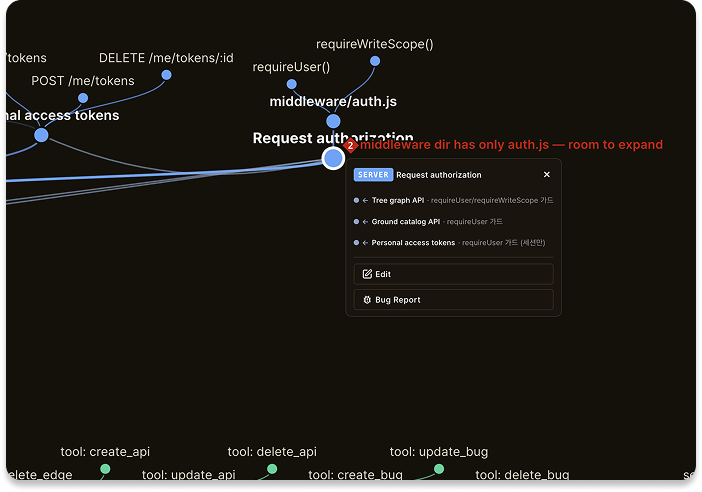
Register a bug right on the node it affects, with its location, risk, and status marked in place. Impact and urgency read far more easily than in a separate version-control or project-management tool — and it guards against the misses that come from an AI’s short context window.

Umtri showing where a bug occurred on a node and its risk level
Plan mode & AI

An interface that makes AI work more efficiently.

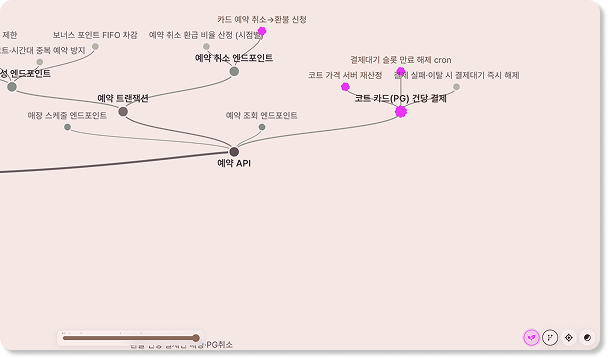
In Plan mode, nodes you intend to add appear as "Plan Nodes"; once built and committed, they become part of the real tree and the project grows. Instead of a stream of one-off prompts, your AI receives the plan as one complete node design — the work goes further with less rework.

Umtri Plan mode — planned nodes highlighted on the tree before they are committed

How to Use

Connect your AI and your pipeline.

Umtri speaks MCP and an open API. Wire it into Claude Code, Codex, Gemini, or your own automation — read the tree, drive Plan-mode designs, and hook it into CI/CD, all behind a token you control.

MCP · Claude Code
claude mcp add --transport http umtri https://mcp.umtri.io \
  --header "Authorization: Bearer <your-token>"

Codex, Gemini, and any MCP client connect the same way — full commands in the docs.

  • MCP-nativeConnect any MCP client over HTTP — no local clone required.
  • Open APIRead and write the tree programmatically from your own tools.
  • CI/CD readyKeep the tree in sync straight from your pipeline.

AI Collaboration

Two ways an AI works through your plan.

Journey 01 — AI Services, MCP, Umtri.io and User lanes for reviewing a plan-mode node design and building it
Journey 01

An AI that reviews your node design and builds it.

"Review all the plan nodes I added in Plan mode."

Through Umtri.io, the AI receives the plan as one complete node design instead of a stream of one-off prompt fragments. This minimizes the errors AI tends to make across a chain of piecemeal instructions, and helps it understand the plan and propose a more efficient structure.

Journey 02 — the same lanes for hearing an idea and designing the nodes before development
Journey 02

An AI that hears your idea and designs the nodes for you.

"Draft a plan to build my idea in Umtri Plan mode."

Through Umtri.io, you can see for yourself how the AI’s development plan grows from the existing tree structure. This cuts unnecessary work and rollbacks, minimizes token use, and makes communication more efficient.

Who it's For

The people who build it — and the people who run it.

Two very different jobs, the same blind spot: not being able to see the whole project. Here's what changes when you can.

Vibe coderbuilding solo, shipping fast with AI
When I keep handing the coding to AI, I slowly lose sight of what my project even looks like. Then a new session runs into a problem, and without the context it fixes the wrong thing until there's no way back. Umtri shows both me and the AI what the project looks like and what this change will touch, so it doesn't get there.

See your project clearly.

Sign in and turn what you're building into a map you can finally read.

Try Umtri.ioBETA